You can cancel Midjourney yourself in about two minutes, and the control lives on the website, not in Discord. Go to midjourney.com, sign in, open your Manage Subscription page, and click Cancel Plan. Your plan benefits keep running until the end of the billing period you paid for, and then generation simply stops, your images stay put.
There's one rule that makes Midjourney different from every other guide in this series: the 20 GPU-minute refund threshold. If you've barely touched the service, real money can come back. If you've generated a normal month of images, it won't. Knowing which side you're on before you click cancel saves you an angry support email later.
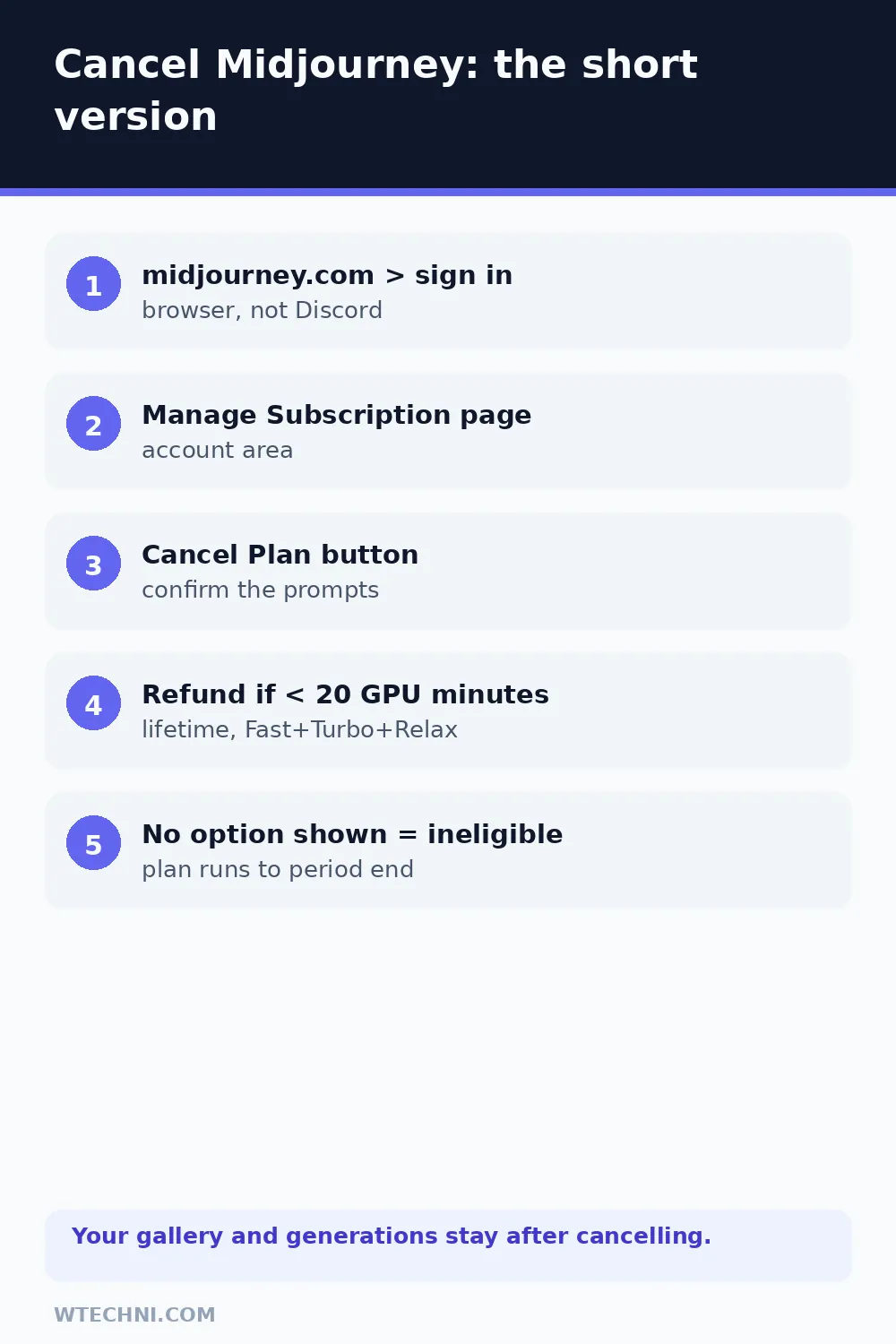
How to cancel Midjourney step by step
Midjourney's own documentation describes exactly this flow:
- Open midjourney.com in a browser and sign in (Discord sign-in works as usual).
- Open your Manage Subscription page, it's under the account area once you're logged in.
- Review your current plan, renewal date, and any usage shown.
- Click Cancel Plan.
- If a refund option appears on screen, you qualify under the 20-GPU-minute rule, take it if you want the money back. If no option appears, you're not refund-eligible; the cancellation proceeds as a standard end-of-period stop.
- Confirm, and watch for the confirmation email.
That last step matters more than people expect. Users on Reddit have described cancelling within days of subscribing, with barely any generation done, and still seeing no refund option, usually because GPU minutes had already crossed the line. Fast generations eat roughly a minute each; Turbo eats more. Twenty GPU minutes is maybe a few dozen images depending on settings, not a generous buffer.
The 20 GPU-minute rule, in plain numbers
Midjourney's refund article is unusually specific: you're eligible for a refund only if you've used less than 20 GPU minutes throughout the lifetime of your account, and that count includes Fast, Turbo and Relax time combined. The refund option appears automatically during cancellation if you qualify, there's no separate claim form, and if the option doesn't appear, support can't conjure it up.
| Your usage by cancel time | What happens |
|---|---|
| Under 20 GPU minutes, lifetime | Refund option appears during cancel. Take it if you want money back. |
| 20+ GPU minutes, lifetime | No refund option. Plan runs to period end, then stops. |
| Mostly Relax usage | Relax time counts toward the 20 minutes too, it's not free of the rule. |
| Billing error or double charge | Different situation entirely. Contact billing support with receipts. |
If your goal is a refund, cancel before you experiment further, since the counter is lifetime, not monthly, and it never resets. If your goal is just to stop paying, none of this matters: cancel whenever and ride out the paid period. Resubscribing later picks up where you left off, with the same gallery and the same lifetime GPU-minute counter waiting for you.
What happens to your generations after cancelling
Your work stays. The web gallery keeps every image tied to your account, and you can browse and download from it after the plan ends. What stops is new generation: no new prompts, no upscales, no variations, and the monthly Fast-hour allowances end with the subscription.
Discord access is separate: staying in or leaving the official Midjourney Discord server has nothing to do with billing, and your web gallery remains the source of truth for your images either way.
Two housekeeping tips before the period ends. First, download any image you care about to your own storage, since the gallery is convenient, but your own disk is forever. Second, if you use Pro-tier features like stealth mode for private generations, remember your future generations become publicly visible on the site gallery once you're off the plan; existing images' visibility follows the terms you generated them under.
Downgrade instead of leaving
If the issue is cost, the Basic plan at US$10 keeps a monthly generation allowance going for the price of a couple of coffees, and Standard's US$30 tier is where unlimited Relax generations begin, the tier most hobby users actually want. Plan changes apply at the next cycle, so a downgrade right after a renewal costs you nothing extra.
Trimming the rest of your AI budget? Our best AI image generators guide covers what Midjourney's rivals cost, and if Canva was your design-side subscription, how to cancel Canva Pro has its own refund nuances worth reading.
Frequently asked questions
Will I get a refund when I cancel Midjourney?
Only if you've used less than 20 GPU minutes across your account's lifetime, counting Fast, Turbo and Relax time together. If you qualify, the refund option appears automatically on the cancellation screen, Midjourney's docs are explicit that if you don't see the option, you're not eligible. Most subscribers who have generated any real volume won't qualify.
What happens to my images when I cancel?
Nothing is deleted. Your gallery and every generation stay visible in your Midjourney web gallery, tied to your Discord account. What stops is new generation: without an active plan you can't create new images, and relaxed-hour or fast-hour allowances end with the subscription.
Can I cancel Midjourney from Discord?
No. Midjourney runs billing on its website, not through Discord commands. Open midjourney.com in a browser, sign in, and use the Manage Subscription page. Discord is where you generate images; the website is where money is handled.
Does cancelling stop the plan immediately or at period end?
It ends at the close of the current billing period. Midjourney's docs describe cancellation as stopping future renewals, and your plan benefits continue until the date you already paid through. A refund-eligible cancellation is the one case where things move faster, since the refund and the access end together.
How do I stop Midjourney from renewing without cancelling now?
You can't toggle auto-renew separately the way some tools allow, the renewal control is the cancel itself, applied at period end. So the practical pattern is: cancel right after a renewal if you want a full month, or cancel before the next billing date and simply lose nothing you paid for.