You can cancel Canva Pro yourself in about two minutes, and you don't need to talk to anyone. Open canva.com, click your profile icon, open Settings, go to Billing, and select Cancel plan on the Pro card. Canva asks you to confirm twice and answer one survey question. That's it. Your renewal stops, and you keep every Pro feature until the end of the period you already paid for.
Two things people mix up constantly: cancelling is not ending your access today, and cancelling is not a refund. The refund question has real nuance, and so does the phone side, because App Store and Google Play subscriptions live in entirely different places. Here's the whole picture.
How to cancel Canva Pro on a computer
Canva's own help center documents this path, and it matches what you'll see on screen:
- Log in to the Canva account (or team) that actually holds the subscription. If you run more than one account, this is the step that saves you later.
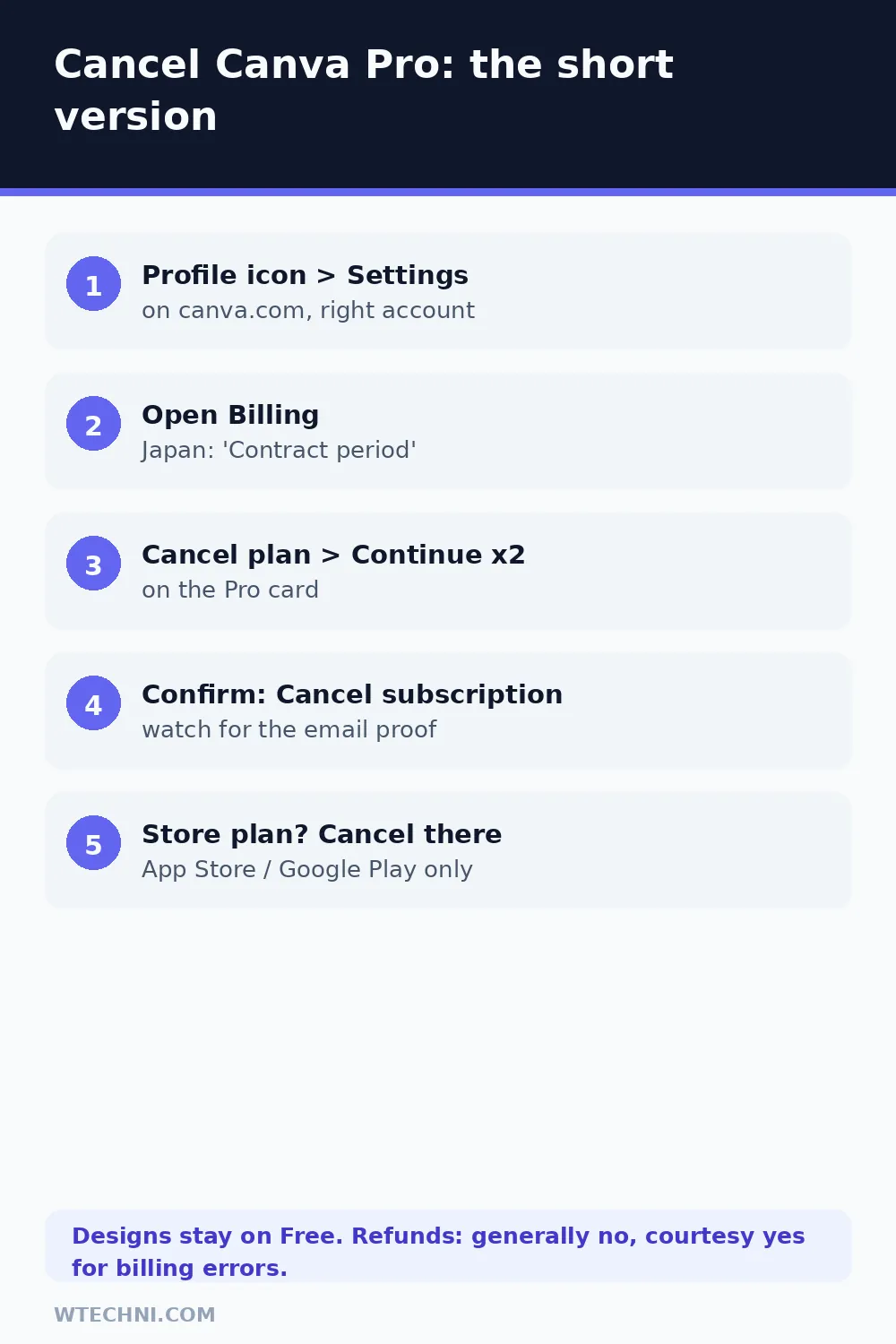
- From the homepage, select your profile icon, then Settings.
- Open Billing. (In Japan this tab is labeled Contract period.)
- On the Pro card, select Cancel plan.
- Select Continue cancellation.
- Choose a reason for leaving, then select Continue cancellation again.
- Add optional feedback if you feel like it.
- Select Cancel subscription to finish.
Watch for the confirmation email. It's your proof that the cancellation actually went through, and if it never arrives, the cancellation probably didn't either. Go back and try again before assuming the worst.
Cancel on iPhone or Android if you subscribed there
Canva cannot cancel a store-bought subscription from inside its own app. This is an Apple and Google rule, not a Canva choice, so don't waste time hunting for the button.
iPhone or iPad: open Settings, tap your name at the top, tap Subscriptions, select Canva, and hit Cancel Subscription. If the button is missing and you only see an expiration date, it's already cancelled.
Android: open the Google Play Store, tap your profile icon, go to Payments & subscriptions, then Subscriptions, select Canva, and cancel there. If Canva isn't listed, you may be signed into a different Google account. Canva's support page specifically calls this out, because it happens a lot on shared devices.
Will Canva refund you? The honest answer
Canva's official refund page says the quiet part plainly: in most cases, Canva subscriptions are not refundable, as its Terms of Use spell out. Cancelling mid-period runs out the clock on what you paid rather than returning it.
That said, money does come back in specific situations. Users on r/canva have posted refund confirmations where support treated something as a courtesy, usually when the charge was arguably Canva's fault or the request came within days. Treat these as reports of what has worked, not promises:
| Your situation | Realistic expectation |
|---|---|
| Cancelled, but charged anyway | Yes, this is a billing error. Support fixes it when you send the invoice ID. |
| Accidental renewal, reported within a few days | Often approved as a courtesy. Not guaranteed, so ask fast and be polite. |
| Changed your mind mid-period | No refund. Your Pro access runs until the period ends. |
| Paid through the App Store | Apple decides. Request it at reportaproblem.apple.com with your Apple ID. |
| Paid through Google Play | Google handles it, and its no-questions window is short (roughly 48 hours). After that, contact Canva support. |
When you contact support, include your invoice ID from the billing email, and if you paid through a store, the order number from Apple or Google. Requests with receipts move much faster than "I want my money back" messages with no details.
What happens to your stuff after cancelling
Your designs are safe. Everything you made stays in your account when the plan flips to Canva Free at the end of the billing period. Folders, share links, and your upload library all stay put too.
What changes is access to premium assets. The 141-million-item stock library, 3.6 million premium templates, background remover, Magic Studio AI, five Brand Kits, and 100GB of storage all shrink back to free-plan limits (the free tier includes 1.6 million templates, one basic Brand Kit, and 5GB). Downloads that contain premium elements get locked or watermarked until you resubscribe. One underrated perk also stays: Affinity, which Canva now includes free with any account.
One serious warning if you're on a team plan. Cancelling Canva Teams is permanent — Canva won't let you resubscribe to Teams afterward. If you think you might want team features again, Canva's own guidance is to switch to Canva Business instead of cancelling outright. Take that seriously before clicking the button, because there's no undo on the Teams side.
Changed your mind already? If the subscription is still active, open the Billing page and select Stay on Canva Pro (or the Teams/Business equivalent). The undo option disappears the moment the paid period ends.
Still being charged after you cancelled?
Three usual causes, in order of likelihood:
- You have two Canva accounts. People sign up with a work email years ago, forget, then wonder why cancelling the new account didn't stop the old charge. Search your inbox for "Canva" billing emails and check which address they go to.
- The store subscription is separate. A web-subscribed Pro and an App Store subscription can coexist on the same person. Cancelling one leaves the other billing happily. Check your App Store and Google Play subscription lists.
- The cancellation never completed. No confirmation email means no cancellation. Redo the flow above.
Identify who charged you by the card descriptor: "Canva" means Canva itself, "Apple.com/bill" or "Google Canva" means the store route. Then contact the right party, because Canva support cannot refund an Apple-billed charge no matter how helpful they want to be.
If the price is why you're leaving
Worth checking before you go: Canva Education (free for eligible K-12 teachers and students) and Canva's nonprofit program cover a surprising number of people. And if you chose monthly billing, switching to annual roughly halves the monthly rate, since US$144 a year works out to US$12 a month versus US$18 monthly.
Design-tool migration has its own subscription traps. If you're headed to Adobe instead, read our guide to Adobe's cancellation fee and the three ways to avoid it before you start an annual plan there. And if this is part of a bigger subscription purge, how to cancel ChatGPT Plus covers the other US$20 that most people forget they're paying.
Frequently asked questions
Can I get a refund from Canva?
In most cases, no. Canva's Terms of Use say subscriptions are generally non-refundable, and its refund page repeats that policy. Support does approve courtesy refunds for billing errors, double charges, or accidental renewals reported quickly, but it is discretionary. If you paid through the App Store or Google Play, only Apple or Google can refund that purchase.
Do I lose my designs if I cancel Canva Pro?
No. Every design stays in your account when the plan drops to Canva Free. The catch is premium elements: photos, templates and AI output that came with Pro become locked or watermarked on the free plan, and downloads that contain them will need Pro again. Your account, folders and share links all survive.
Why was I charged a day before my free trial ended?
Canva's billing system runs on Coordinated Universal Time (UTC). If you signed up late in the day, your local midnight arrives after the UTC cutoff, so the charge can appear roughly a day earlier than you expected. Canva confirms this is normal and not a billing error.
How do I cancel Canva Pro on my phone?
It depends on where you paid. If you subscribed through the App Store, open iPhone Settings, tap your name, then Subscriptions, and cancel Canva there. On Android, use Google Play's Payments and subscriptions screen. Deleting or uninstalling the Canva app does not cancel anything.
Can I undo a Canva cancellation?
Yes, as long as the subscription is still active. Go back to the Billing page in Settings and select the option to stay on Canva Pro (or Teams/Business). Once the paid period actually ends, there is no undo button; you would subscribe again as a new purchase.
Frequently asked questions
Does deleting the Canva app cancel my subscription?
No. On mobile-billed plans the subscription lives in your Apple or Google account, not the app. Delete the app and it keeps renewing invisibly until you cancel it in Settings (iOS) or the Play Store (Android).
Will I lose my designs if I cancel Canva Pro?
No. Your designs stay in your account when it converts to Canva Free, along with your folders, share links, and uploads. Only Pro-only features lock, and resubscribing brings everything back instantly.
Can I get a refund on a yearly Canva Pro plan?
Generally no — Canva's Terms of Use make subscriptions non-refundable in most cases, though support reviews every request. If Apple billed you, refunds go through Apple at reportaproblem.apple.com instead.
How do I know my cancellation actually worked?
Three checks: the confirmation email arrived, your Billing page shows the plan with an expiry date instead of a renewal date, and no new charge appears on your next statement date.
Is canceling Canva Teams the same as canceling Pro?
The flow is similar, but canceling Canva Teams is permanent — Canva does not allow resubscribing to a canceled team. If you only meant to end a Pro seat, do not use the Teams cancellation flow.
Does Pro end immediately when I cancel?
No. Cancelling stops future payments only. You keep every Pro feature until the end of the billing period you already paid for, and the plan then flips to Canva Free automatically.
Sources and testing notes
Steps in this guide were verified against Canva's live help documentation on October 20, 2026: the Cancel a Canva plan and Refunds for Canva subscriptions help pages, plus public r/Canva threads for real-world refund outcomes. Billing menus move — if a step no longer matches your screen, tell us and we will re-test.
Related guides: Cancel Adobe without the cancellation fee · How to cancel ChatGPT Plus · Cancel Grammarly Premium + refund route