
Getting out of NordVPN cleanly takes two moves, and people only ever do the first one. Cancelling auto-renewal in your dashboard stops future charges but returns nothing. The refund itself comes from a separate flow through NordVPN's support chat, which is now mostly automated and, as of 2026, is one of the faster refund processes among subscription services.
If you're inside your first 30 days, you're likely entitled to every cent back. Outside that window, cancelling still costs you nothing extra; you just ride the plan to its end. Here's both paths in detail.
Cancelling vs refunding: two different doors
This distinction saves people a lot of frustration. NordVPN's dashboard has a cancellation flow that turns off auto-renewal. It asks why you're leaving, may offer you a discount, and then confirms the plan won't charge again. Useful, but it does not move money backwards.
The refund is a support-chat process. You talk to the bot (or a human), verify your identity through a link, and get shown which payments qualify. If you cancel the dashboard way first and then ask for money, nothing is lost: the refund flow still works. But if you only cancel and never open the chat, no refund ever happens. The order doesn't matter much; doing both does.
Get the refund: the current step-by-step
NordVPN's official refund policy page documents this flow, which they've automated end to end:
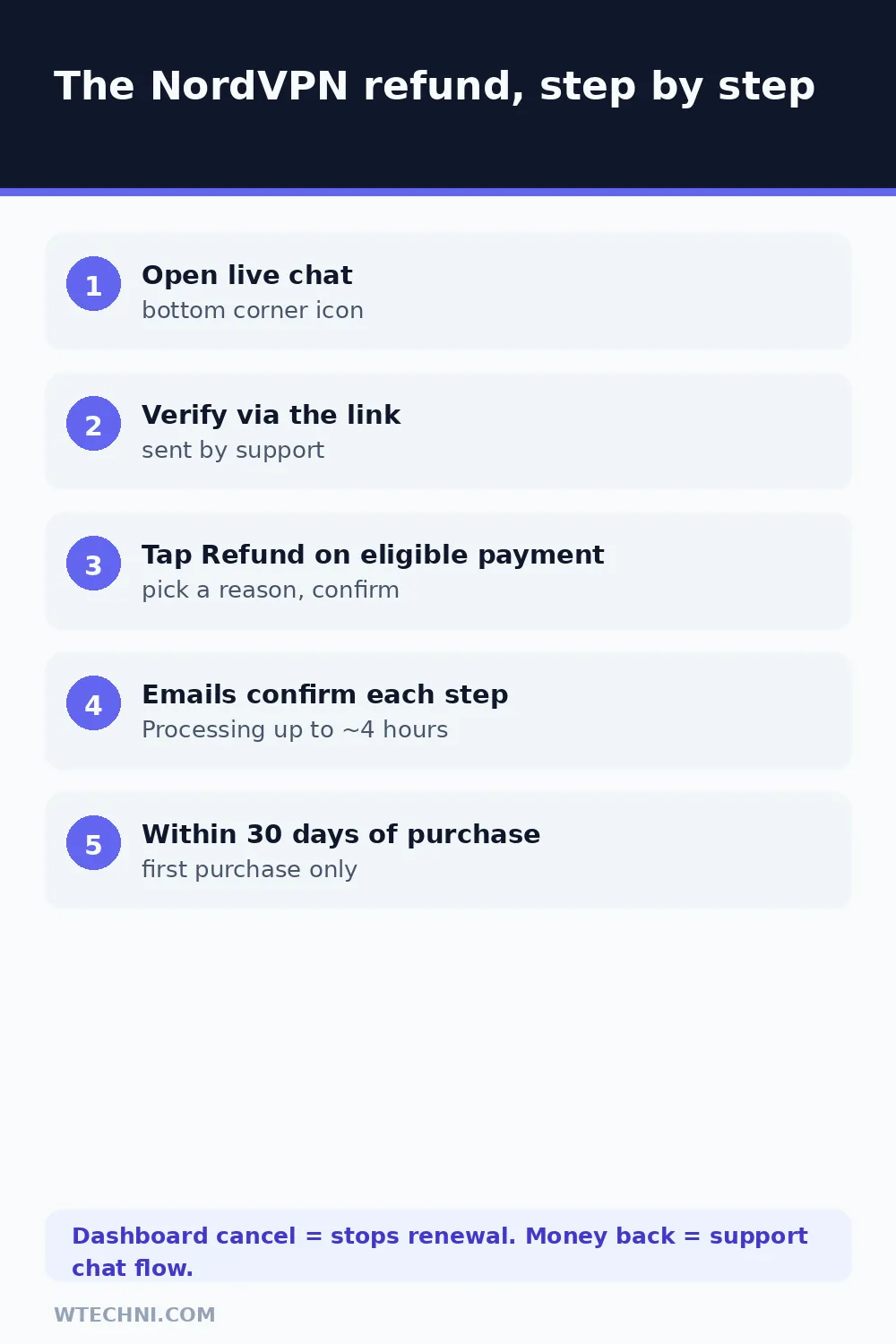
- Open the support site or your account page and start live chat from the icon in the bottom corner.
- Ask for a refund. Support sends you a verification link to confirm it's really you.
- Once verified, the system shows which of your payments are eligible, with a Refund button next to each.
- Pick a reason for the cancellation and submit.
- Confirm the refund by clicking Refund.
- Watch for the confirmation email saying the refund has been ordered.
- The status moves to Refund Processing, which takes up to about 4 hours.
- A final email lands when the status shows Refunded.
Do all of this inside the 30 days from purchase. The clock starts at the payment, not at the moment you got around to opening the chat.
Where you bought it decides who refunds you
NordVPN's own policy table splits refund responsibility by storefront, and this is the part most guide posts get wrong:
| You paid through | Refund path |
|---|---|
| nordvpn.com (web) | NordVPN's chat flow above. This is the cleanest path with the automated Refund button. |
| Apple App Store | Apple only. Request it at reportaproblem.apple.com; NordVPN cannot issue it. |
| Google Play | NordVPN support handles Play purchases within its refund terms. For charges under roughly 48 hours old, you can also request directly from your Google Play order history. |
| Amazon Appstore | Contact Amazon directly. |
| A retailer or reseller | The retailer's own refund policy applies. NordVPN points you back to whoever sold it. |
Check your receipt before opening the chat. Waiting in NordVPN's queue with an Apple-billed subscription wastes twenty minutes and ends with "contact Apple," because the money literally never passed through NordVPN's hands.
Cancel auto-renewal so nothing charges again
Whether or not you want a refund, turn off the renewal. Log into your NordVPN account, open the subscription section of the dashboard, and use the cancellation option there. Confirm the screen shows auto-renewal as off and note the date your current plan expires.
Your service keeps working until that expiry date, on whatever plan length you paid for. Nothing else gets charged. If you change your mind before then, you can re-enable renewal from the same screen without losing anything.
Outside the 30 days? Cancelling still costs you nothing
Missed the window, or the charge that just hit you was a renewal? You won't get money back under the guarantee, but exiting properly is still free. Turn off auto-renewal in the dashboard, note the expiry date, and the plan simply runs out. No termination fee, no penalty, nothing further billed. NordVPN has no early-exit charge of the kind Adobe users dread; the only money at risk is the period you already paid for.
If that renewal charge stings, remember the pattern for next time: NordVPN's best pricing is for new customers on long plans, and the renewal rate after the first term is noticeably higher. Mark your renewal date about a week out. Whether you stay or go, deciding before the charge lands is what keeps this subscription cheap.
Refund request declined? The usual causes
The automated flow declines requests for a short list of reasons, and each has a different fix. If the payment shown isn't eligible because a refund was already issued for it, that's the one-refund-per-subscription rule, and no amount of chat escalation changes it. If the charge belongs to a renewal rather than the first purchase, the guarantee doesn't apply, though you can still ask support whether local consumer law offers anything in your country.
Requests past day 30 fail on the date rule. Purchases from Apple, Amazon, or a retailer get bounced to those storefronts rather than processed. And if the verification link doesn't work, request a fresh one; expired links are the most common technical hiccup in the flow. Genuine billing errors, like being charged twice, sit outside the guarantee entirely: those go to support as disputes, and users report NordVPN fixing them once receipts are provided.
After the refund: access and expectations
Once the refund completes, the subscription it was tied to ends. That's the trade, and NordVPN's policy is upfront about it: the refunded payment funds access that stops. Bank timing varies; the Refunded status in your account is the real milestone, and card statements typically show the credit within a few business days after that, depending on your issuer.
Thinking about coming back later? NordVPN runs introductory pricing for new customers, and a lapsed account that already refunded its first purchase won't be eligible for another money-back cycle on the same subscription. That's the fine print most "I'll just refund and resubscribe" plans stumble over.
If you're auditing your whole subscription stack this week, two more guides pair well with this one. Adobe's cancellation fee is the opposite philosophy: half your remaining contract, unless you know the three exits. And cancelling ChatGPT Plus covers the 24-hour billing rule that catches almost everyone on monthly AI plans.
Frequently asked questions
How does NordVPN's 30-day money-back guarantee work?
It covers new subscriptions: request a refund within 30 days of your first purchase and NordVPN returns what you paid. The guarantee applies to the initial purchase only. Renewed billing periods, requests after day 30, and repeat refunds on the same account are not eligible, though local consumer law can override in some regions.
Does cancelling auto-renewal get me a refund?
No, and this is the most common mix-up. Cancelling auto-renewal in your NordVPN dashboard only stops future charges. To get money back you must contact support through live chat and use its refund flow while you're still inside the 30-day window.
How do I get a refund if I paid through the App Store?
Apple processes those refunds, not NordVPN. Go to reportaproblem.apple.com, sign in with the Apple ID that paid, find the NordVPN charge, and request a refund there. NordVPN's support page states plainly that it cannot refund App Store purchases.
How long does a NordVPN refund take to arrive?
The refund itself processes fast: the status moves to Refund Processing within a few hours, then to Refunded once done. How quickly the money appears on your statement depends on your bank or card issuer, typically a few business days.
What happens to my NordVPN access after a refund?
The refunded subscription ends. NordVPN's refund policy notes that once the refund is issued, your access to the paid service stops, since the payment that funded it has been returned. You keep any free-account features, but the VPN plan itself is done.