Cancelling ChatGPT Plus takes under a minute on the web: sign in at chatgpt.com, open Settings, select Billing, and click Cancel under the Cancel plan heading. Your paid features stay switched on until the end of the period you already paid for, then the account quietly drops back to the free tier.
The parts that actually confuse people are the edges. Subscriptions bought on a phone live in Apple's or Google's world, not OpenAI's. The renewal date can bite if you cancel too close to it. And refunds exist, but only for specific situations that OpenAI spells out in its help center. All of that is below, with the exact steps for each path.
Cancel ChatGPT Plus on the web
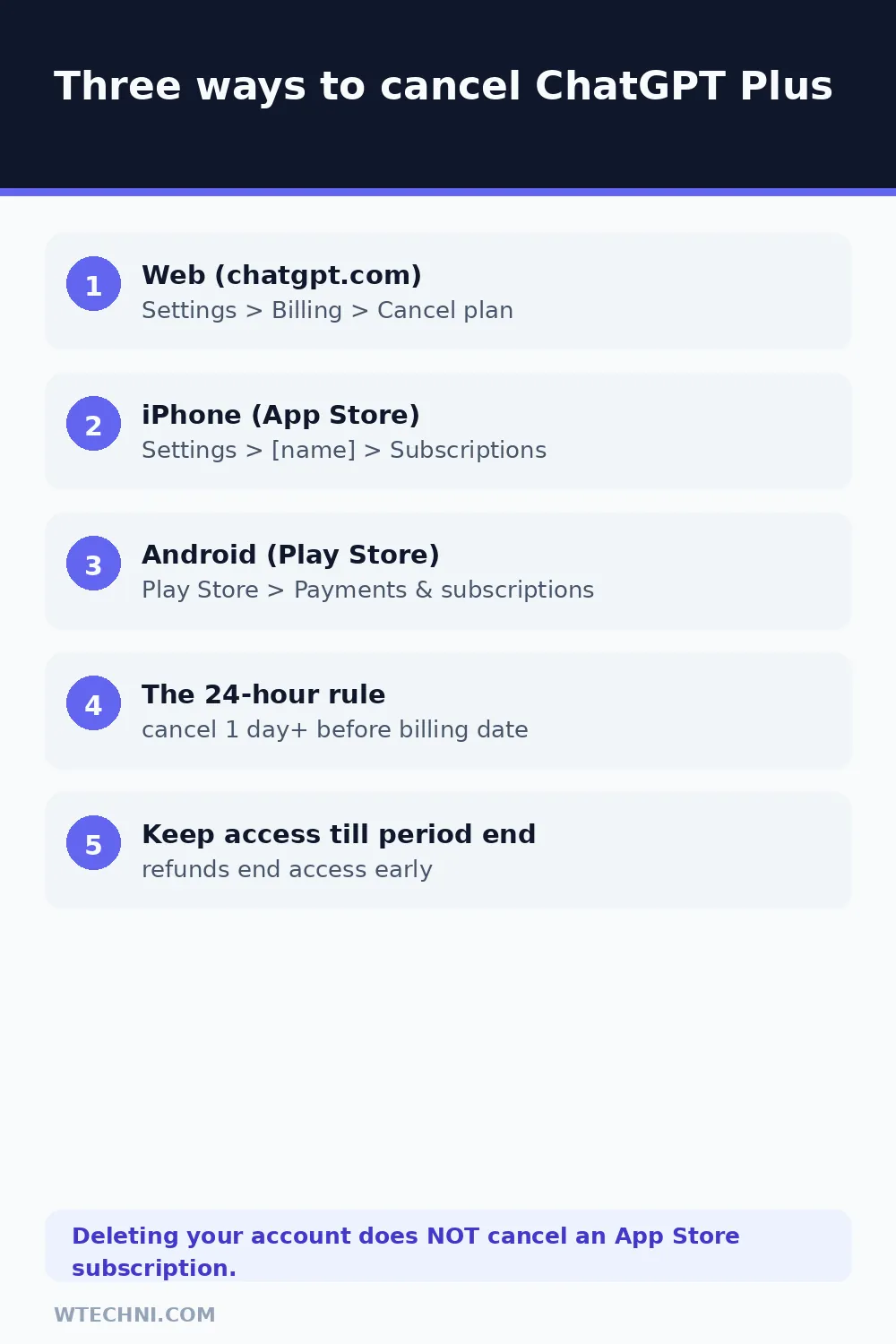
This is the path OpenAI's help center documents for subscriptions bought on chatgpt.com:
- Sign in to ChatGPT with the account that holds the Plus plan.
- Open your account menu and select Settings.
- Select Billing.
- Under Cancel plan, select Cancel.
- Follow the confirmation prompts to the end.
Check the confirmation screen for your new renewal state. It should show the plan as cancelled or non-renewing, with the date access ends. Screenshot it if you like keeping receipts; if a charge appears anyway, that screenshot is your first piece of evidence.
Cancel on iPhone (App Store subscriptions)
If the charge comes from Apple, OpenAI's own guidance is blunt: cancel through Apple. From your iPhone or iPad:
- Open Settings.
- Tap your name at the top.
- Tap Subscriptions.
- Select ChatGPT.
- Tap Cancel Subscription and confirm.
If Cancel Subscription isn't shown and you only see an expiry date, the subscription has already been cancelled. One warning OpenAI repeats because so many people trip on it: deleting your ChatGPT account does not cancel an App Store subscription. Apple keeps billing until you cancel in Apple's settings.
Cancel on Android (Google Play subscriptions)
Google Play purchases cancel in Google's ecosystem too. Open the Play Store app, tap your profile icon, go to Payments & subscriptions, then Subscriptions, select ChatGPT, and tap Cancel subscription. You can also do it from the Play website: sign in with the same Google account, open your subscriptions list, pick ChatGPT, and cancel there.
Signed in with the wrong Google account is the classic Android failure mode, especially on devices that switched owners. If ChatGPT doesn't appear in the list, check your other Google accounts before assuming anything else is broken.
Canceling a ChatGPT Business workspace
Team and Business plans cancel from a different screen, and only a workspace owner or billing admin can reach it. Sign in, open your account menu, choose Workspace settings, select Billing, then Manage plan, and finally Cancel subscription. If the option is greyed out for you, you're a member rather than the owner, and OpenAI's guidance is to ask the workspace owner to handle it.
Worth a minute of planning before you cancel a team plan: everyone in the workspace loses the paid features the moment the cancellation takes effect at period end, including shared projects and higher model limits. Export anything the team needs first, or downgrade the seat count instead if only some people are leaving.
Can't find your subscription at all?
OpenAI's troubleshooting page exists because this happens constantly. Start with the receipt: search your email for "OpenAI" or "ChatGPT" and look at which platform issued it. A chatgpt.com receipt means the subscription lives in Settings on the website, and it will never appear in Apple's or Google's subscription lists, no matter how long you scroll.
If the receipt says Apple, open the App Store subscription list on the device where the purchase happened. Family Sharing setups add another layer: the subscription may sit under a family member's Apple ID. And if the plan shows as active on your receipt but Plus features aren't working in the app, you're probably signed into a different ChatGPT account than the one that paid. Log out, sign back in with the billing email, and check the Billing screen before contacting support.
So, will OpenAI refund your last payment?
OpenAI's refund page is more detailed than most people expect, and it separates automatic rights from discretionary ones. Here's the current structure as of October 2026:
| Situation | What OpenAI's policy says |
|---|---|
| Billing error or unauthorized charge | Refunds approved once verified. This is the strongest case. |
| Unused subscription, request within ~7 days | Discretionary refund possible for the current period, if you confirm you understand access ends when refunded and you haven't heavily used the service. |
| EU, UK, or Turkey resident | Prorated refund if you cancel within 14 days of purchase, reflecting local consumer law. |
| South Korea resident | Full refund within 7 days if the service was unused; otherwise a prorated refund based on the remaining period. |
| Used the service, past the windows, no billing error | Generally non-refundable. Your cancellation simply runs to period end. |
To make a request: sign in at help.openai.com with the same account that was charged, open the chat widget in the bottom-right corner, and ask for a refund. The widget now shows a quick eligibility summary before connecting you with an agent, which is a recent improvement. Processing takes 5 to 7 business days for web purchases, around 10 business days for Google Play, and Apple purchases go through Apple's own refund system instead.
One quirk from the refund page worth knowing: if you paid partly with ChatGPT wallet credit, the refund can be split, with credit returning to the wallet and the rest to your card. And if a refund is granted, access covered by it ends early. Refunded months don't keep working.
What survives the cancellation
More than people fear. Your chat history, custom instructions, GPTs, and project folders all stay in the account. When the paid period ends, you land on the free plan with lower usage limits and lose the heavier models, but nothing is deleted. Resubscribe next month and the lights come back on exactly where you left them.
If your reason for leaving is that Plus stopped feeling worth US$20 a month, timing matters more than the cancel button. Cancelling near the start of a billing cycle wastes almost a full month of access you paid for; cancelling a day before renewal wastes nothing. Check the renewal date on the Billing screen first, then decide whether to ride out the month.
Before you click cancel: three quick checks
- Confirm which platform bills you. Your app store receipt list and chatgpt.com billing screen tell you in seconds. A chatgpt.com purchase never appears in Apple's subscription list, and vice versa.
- Check for duplicate subscriptions. People occasionally have Plus on a work account and a personal one. Cancelling one leaves the other renewing, and duplicate charges are the second most common refund request OpenAI's troubleshooting page mentions.
- Note the billing date. The 24-hour rule only hurts people who ignore it.
Subscriptions love to travel in packs. If you're trimming the whole stack, we have a separate guide to cancelling Canva Pro, including its refund policy's honest fine print, and one on Grammarly's Premium-to-Pro rename, which is confusing half the people trying to cancel it right now.
Frequently asked questions
Does cancelling ChatGPT Plus get you a refund?
Not automatically. Cancelling stops future renewals only. OpenAI's policy calls payments generally non-refundable, but it does approve refunds in specific cases: unused subscriptions within about 7 days at its discretion, EU, UK and Turkey residents within 14 days of purchase, documented billing errors, or unauthorized charges. You request these through the help widget while signed in.
Do I keep ChatGPT Plus until the end of the month after cancelling?
Yes. An ordinary cancellation keeps every paid feature active until the end of the current billing period, then the account drops to the free tier. The one exception is a refunded subscription: access covered by the refunded charge ends early.
How do I cancel ChatGPT Plus on my iPhone?
If you subscribed through the Apple App Store, open iPhone Settings, tap your name, then Subscriptions, select ChatGPT, and tap Cancel Subscription. OpenAI cannot cancel or refund App Store purchases for you; only Apple can.
Does deleting my ChatGPT account cancel the subscription?
It cancels subscriptions billed directly by ChatGPT, but it does not cancel Apple App Store subscriptions, and OpenAI warns specifically about this. If you have an App Store subscription, cancel it through Apple's subscription settings before you delete the account.
What happens to my chat history after cancelling ChatGPT Plus?
Your chats and account survive. When the billing period ends, the account simply reverts to the free plan: same history, same custom instructions, lower model limits. You can resubscribe later and everything picks up where it left off.