
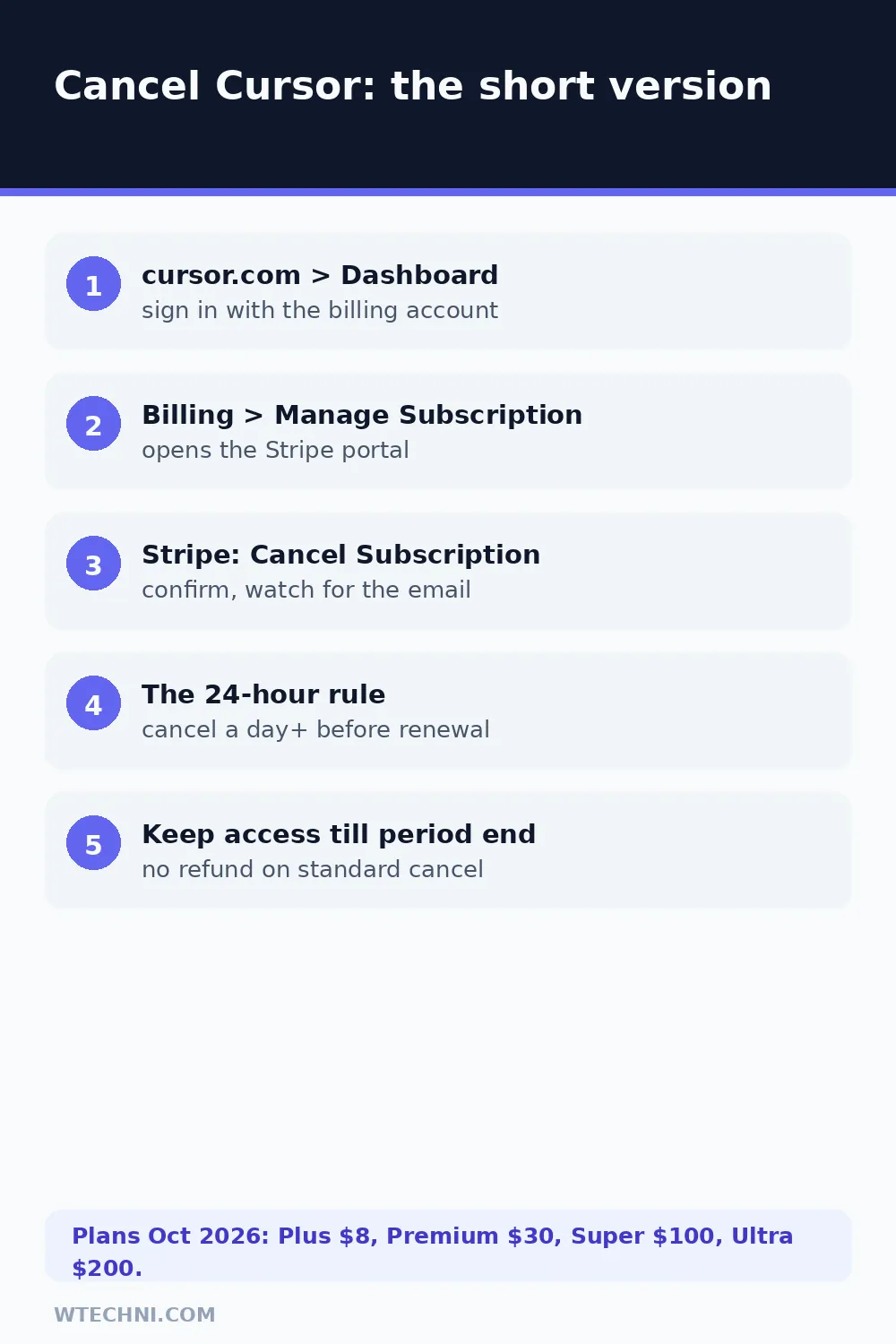
You can cancel any paid Cursor plan yourself in about three minutes, and the button lives on the website, not in the editor. Sign in at cursor.com, open your Dashboard, go to Billing, and select Manage Subscription. That opens a Stripe portal, and inside it you'll find the Cancel Subscription button. Confirm once, and your renewal stops on the spot while your paid features keep running until the end of the period you already covered.
There are only three real traps here. The first is hunting for the cancel button inside the Cursor editor, where it doesn't exist. The second is the 24-hour rule: Cursor asks you to cancel at least a day before your renewal date. The third is assuming cancelling means a refund, it doesn't. Let's walk through the whole thing properly.
How to cancel Cursor on the website (the real flow)
Cursor runs its card payments through Stripe, and that's where the cancellation actually happens. Cursor's own forum staff have confirmed this path:
- Go to cursor.com and sign in with the account that holds the subscription. If your team bought the seats, the admin account is the one that matters.
- Open your Dashboard.
- Select Billing.
- Choose Manage Subscription (or Manage in Stripe). A Stripe-hosted portal opens in a new tab.
- In the Stripe portal, select Cancel Subscription.
- Confirm the cancellation and watch for the confirmation email from Stripe.
That confirmation email is your receipt of truth. If it never arrives, log back into the Billing page and check the plan still shows as active-but-cancelling. If it shows plain active with a next charge date, the cancellation didn't take, run it again.
The 24-hour rule, and why it bites
Cursor's pricing page states plainly: cancel anytime, at least 24 hours prior to renewal, to avoid additional charges. In practice this means the renewal charge can be authorised slightly before your billing date lands. If you cancel at 11pm the night before, the charge may already be locked in.
The fix is boring but effective: cancel a few days before the date, not hours. Your access doesn't shorten by doing it early, you simply stop the next cycle from starting. And if a charge does slip through immediately after you cancelled, screenshot the cancellation confirmation and take it to support. That's a billing error, and billing errors are the one category where refunds genuinely happen.
Will Cursor refund you?
Here's the honest picture. Cursor doesn't advertise a refund button, and a standard "I changed my mind" cancellation runs out your paid time rather than returning money. But refunds do happen in specific situations, and users have posted successful cases:
| Your situation | Realistic expectation |
|---|---|
| Charged after you already cancelled | Billing error. Contact support with the Stripe invoice ID, this is the strongest refund case. |
| Double charge in the same cycle | Billing error again. Support fixes these, and Cursor has publicly refunded unexpected charges in bulk before. |
| Changed your mind mid-period | No refund. Access runs to the end of the paid period. |
| Usage-based charges surprised you | Discretionary. After the August 2026 Auto pricing change, Cursor refunded affected users who emailed support, worth asking if your bill spiked. |
When you write to support, lead with facts: the invoice ID from Stripe, the date and amount of the charge, and one line on what went wrong. Requests with receipts get answered faster than anger without details.
Cancel on a Cursor Teams plan
If you're the billing admin for a team, the flow is the same, Dashboard, Billing, Manage in Stripe, but the blast radius is bigger. Cancelling affects every seat, and your teammates' usage pools stop at the end of the cycle. If only one person is leaving, remove their seat instead; the plan keeps running for everyone else and you stop paying for that person immediately.
Teams created on older pricing keep their legacy seats, and downgrading a seat tier (for example Premium to the free tier) follows the same end-of-cycle timing. When in doubt, change one seat first, confirm what the invoice shows, then decide about the whole plan.
Downgrade instead of cancel
Sometimes the problem isn't the subscription, it's the tier. If Premium's US$30 a month is the issue, Plus at US$8 keeps you on paid models with a smaller pool. If you're leaving for a season, drop to Free and keep your settings intact. The switch applies from the next cycle, so a mid-period downgrade doesn't refund the difference, time it right after a renewal if every dollar counts.
If you're rebuilding your AI toolkit anyway, our guide to cancelling Perplexity Pro covers the other AI subscription with a genuinely good 14-day refund window, and how to cancel Notion walks through the workspace plan most Cursor users seem to pair with it.
Frequently asked questions
Can I get a refund when I cancel Cursor?
Cursor doesn't publish a self-serve refund policy for standard cancellations. Cancelling stops future renewals and your access runs to the end of the period you paid for. If you were double-charged or billed after cancelling, that's a billing error, contact Cursor support with the invoice and they have refunded users in cases like that.
What happens if I cancel less than 24 hours before renewal?
Cursor's pricing page says to cancel at least 24 hours before your renewal date. Miss that window and the next charge can already be in flight, so the safest move is to cancel a few days early. If a charge slips through right after you cancelled, raise it with support as a billing error.
Do I cancel inside the Cursor app or on the website?
On the website. Open cursor.com, sign in, go to your Dashboard, open Billing, and choose Manage Subscription, that drops you into Stripe's secure portal where the actual Cancel button lives. The Cursor editor itself has no cancellation screen.
Will I lose my settings, extensions or chat history?
No. Cancelling only changes your plan. Your settings, keybindings, extensions and project files stay exactly where they are. When the paid period ends, the editor simply drops back to the free tier with its smaller usage allowance, and paid-model requests stop.
Can I switch to a cheaper Cursor plan instead of cancelling?
Yes, and it's often the smarter exit. From the same Billing area you can move from Premium (US$30 a month) down to Plus (US$8 a month) or back to Free without talking to anyone. The change applies from your next billing cycle, so you don't lose days you already paid for.